❤️ Beyond Words: React Instantly to Chat Messages
Express your feelings, reduce chat noise, and boost community engagement with just a tap.
Today, we are thrilled to announce a major and highly requested addition to Now4real, designed to make your instant communities even more engaging, personal, and fun: Message reactions are officially here!
A New Layer of Interactivity
Sometimes, a single emoji says more than a thousand words. Reactions introduce a powerful yet lightweight layer of interactivity to your pages, giving visitors the ability to express their feelings instantly and effortlessly.
Whether they want to agree with a point, share a laugh, or show some love, users can now leave quiet feedback with just a click or a tap. This makes acknowledging a brilliant idea or a funny comment easier than ever, keeping the main chat completely uncluttered while actively fostering a deeper sense of community.
To make the experience seamless, we’ve designed the interface to be as familiar as the messaging apps you use every day, ensuring everyone can jump in and start reacting right away.
How to React
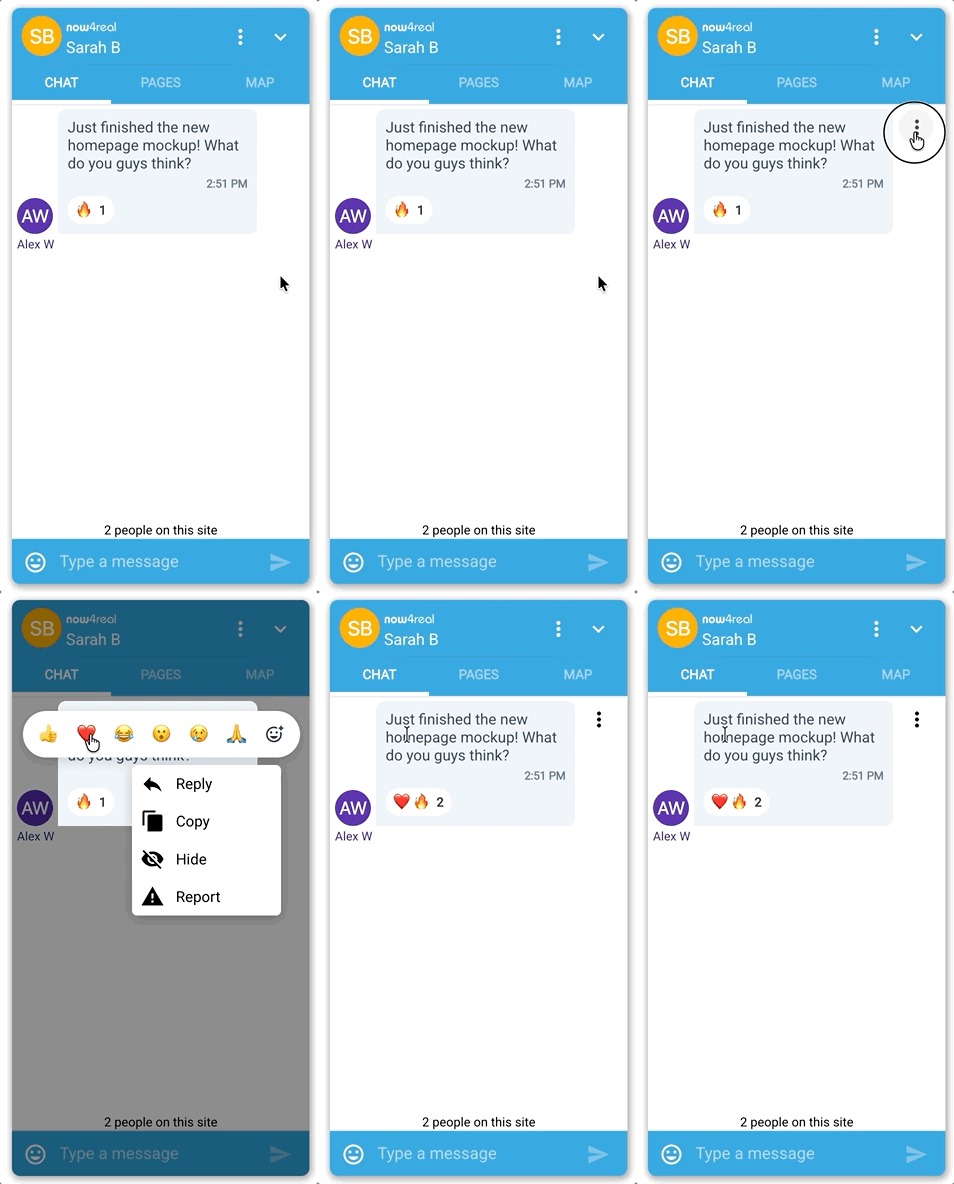
Adding a reaction to a message in the Now4real chat widget is incredibly intuitive. Just open the message menu—by hovering over a message and clicking the three dots on a desktop, or simply tapping the message bubble on mobile.
Right above the standard actions you already know (like Reply, Copy, or Edit), you’ll see a row of the six most popular quick reactions (just like on WhatsApp), plus a button to open a full emoji picker if you need something more specific.
Who Reacted? Just a Click or Tap Away
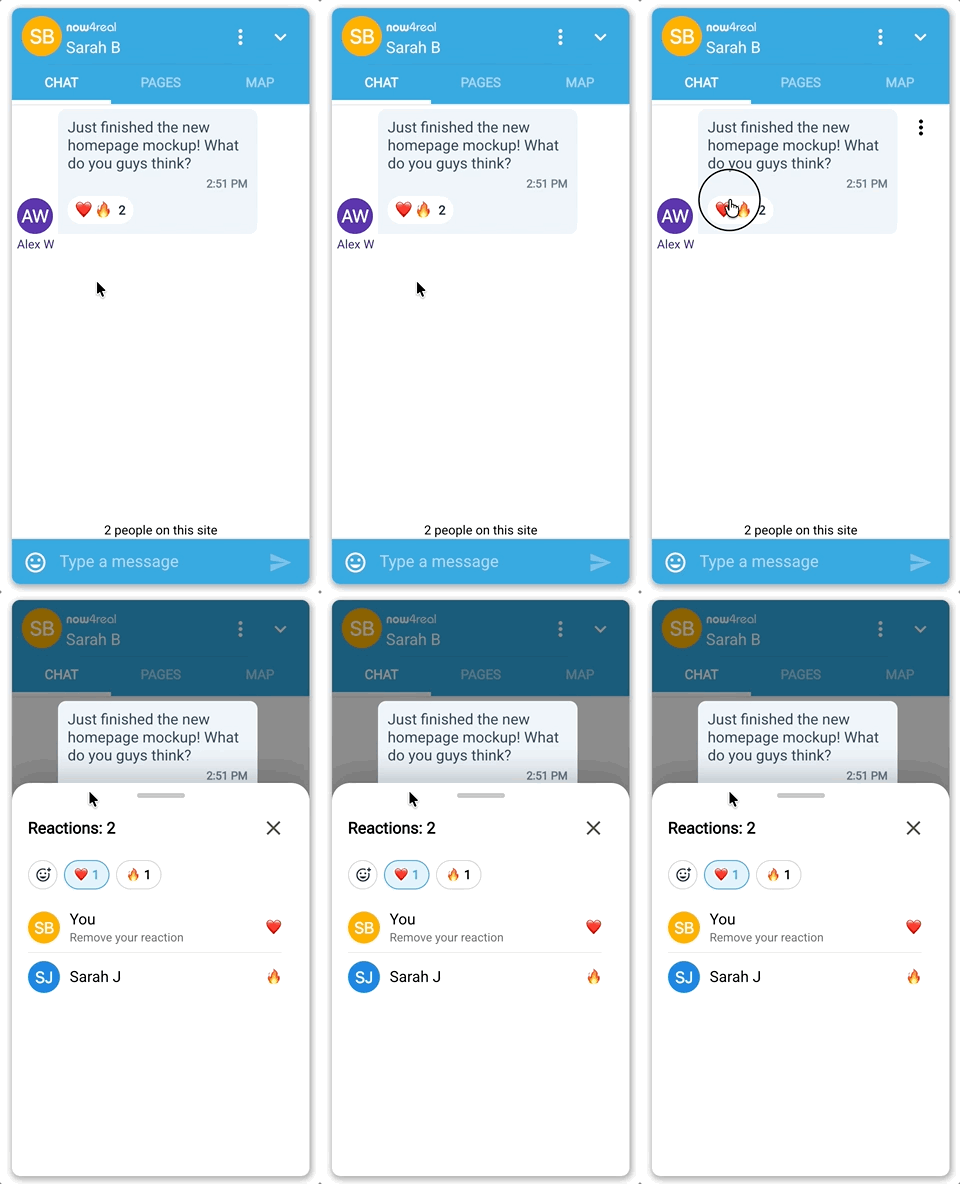
Once a message receives a reaction, Now4real displays a small pill below it with the most-voted emojis and the total count.
Curious to see exactly who reacted, or need to change your mind? Just click or tap on that pill! A detailed view will slide up, showing the full list of users and their specific reactions. If you left a reaction yourself, you will see it conveniently displayed right at the very top of the list, labeled simply as “You”, where you can easily remove it with a single tap.
Insights for Site Owners
While reactions are a fantastic way for visitors to connect, they also offer valuable insights for site owners. We’ve made sure you can easily keep a pulse on your community’s sentiment and see what content drives the most engagement:
-
Dashboard Transcripts: Simply log into your Now4real Dashboard. You will now see user reactions attached to messages right inside your Chat Transcripts section.
-
Email Reports: Do you rely on email reporting to monitor your communities? Reactions are now included in those chat message reports as well!
This gives you a quick, at-a-glance way to spot trending conversations and understand exactly what resonates best with your audience.
Immediate Rollout
This feature is already rolled out to all Now4real widgets starting today, across all plans. It is automatically active, and there is absolutely nothing you need to configure on your dashboard. Your users can start reacting right away!
Ready to see Now4real Message Reactions in action? Jump into the chat on your own website and start reacting to the moment. As always, we’d love to hear your feedback!
July 2, 2026
Originally published: July 2, 2026
Table of Contents
Recent articles


Add Now4real to your site today
Easy. Free. Instant.
Let visitors chat, discover hot pages, and build instant communities—right on your website.


Details and disclaimer


